IGNOU Study Material Status 2026: Are you waiting for your IGNOU books to arrive? If you have enrolled in a programme at Indira Gandhi National Open University (IGNOU), checking your IGNOU Study Material Status is an important step after admission. Students often want to know whether their printed books have been dispatched, whether the study material is available online, and what to do if the books have not arrived before assignment submission or examination preparation.
IGNOU provides an online facility that allows students to check study material dispatch information for different admission sessions. Students can also access digital learning resources through eGyanKosh, the university’s digital repository. This means you can continue studying while waiting for printed books, provided the relevant course material is available online.
In this guide, you will learn how to check IGNOU Study Material Status 2026, track printed books, download study material PDFs, understand common status messages, and contact the university if your books have not been delivered. The article also includes important official links, troubleshooting tips and frequently asked questions.
IGNOU Study Material Status 2026: Overview
IGNOU offers distance and online education programmes to learners across India and abroad. Depending on the programme and the student’s selected study material option, course resources may be available in printed or digital form.
The university’s Material Production and Distribution Division (MPDD) handles study material production and distribution. Students can check the relevant session’s dispatch status through the official IGNOU website.
| Particular | Details |
|---|---|
| University name | Indira Gandhi National Open University |
| Common search term | IGNOU Study Material Status 2026 |
| Main purpose | Check the dispatch status of printed study materials |
| University website | https://www.ignou.ac.in/ |
| Study material status page | https://www.ignou.ac.in/pages/65 |
| July 2026 dispatch status | https://gradecard.ignou.ac.in/mpddstatus/Jul26/StudentMaterialStatus.aspx |
| Digital study material | https://egyankosh.ac.in/ |
| Student services | Available through the official IGNOU website |
| Responsible division | Material Production and Distribution Division (MPDD) |
| Information generally required | Enrolment number and any additional details requested by the portal |
| Delivery method | As specified by IGNOU, including dispatch by post where applicable |
| Who can use digital material? | Students whose programme and course resources are available online |
The available status links depend on the admission session. Visit the official status page to select the appropriate session rather than assuming that every student should use the same tracking link.
How to Check IGNOU Study Material Status Online?
Checking your IGNOU study material status is straightforward. You generally need your enrolment number and the session-specific tracking page.
Follow these steps to check whether your printed books have been dispatched.
Step 1: Visit the Official IGNOU Website
Open the official IGNOU website:
Use the university’s own website to locate student services and study material status information. This helps you avoid unofficial pages that may provide outdated links.
Step 2: Open the Study Material Status Page
Visit the official student status page:
https://www.ignou.ac.in/pages/65
Look for the section titled “Study Material Status.” IGNOU lists session-specific links, including January and July admission sessions.
Step 3: Select Your Admission Session
Choose the session that corresponds to your admission. For example, students admitted in July 2026 should look for the July 2026 status option, while students from January 2026 should use the relevant January session link if available.
Selecting the correct session is important because the tracking pages may be separate.
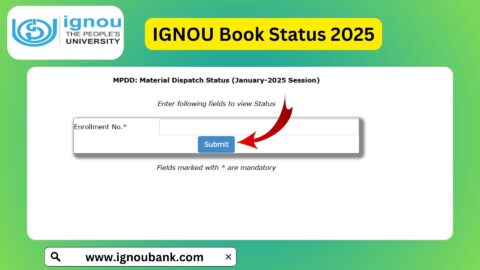
Step 4: Enter Your Enrolment Number
Open the appropriate status portal and enter your enrolment number in the required field. The portal may ask for additional information, such as the programme code, depending on the particular tracking page.
Enter the details carefully. An incorrect enrolment number or a mismatch between the selected session and your admission details may prevent the portal from showing the expected information.
Step 5: Submit the Details
Click the submit or status-check button provided on the page.
If your information is accepted and records are available, the portal should display the status of your study material dispatch. Depending on the information recorded, you may be able to determine whether processing or dispatch has taken place.
Step 6: Check the Dispatch Information
Read the information displayed on the screen. If dispatch information is available, keep a record of it for future reference.
If the portal does not display any details, do not immediately assume that your admission has been cancelled or that your books will never be delivered. Check your admission confirmation, selected study material option and the official instructions for your session.
IGNOU Study Material Status Links for January and July Sessions
IGNOU provides separate study material status options for different admission sessions. Always use the session that matches your admission.
| Admission session | Where to check |
|---|---|
| July 2026 | https://gradecard.ignou.ac.in/mpddstatus/Jul26/StudentMaterialStatus.aspx |
| January 2026 | Open the January 2026 option on the official status page |
| July 2025 | Open the July 2025 option on the official status page |
| January 2025 | Open the January 2025 option on the official status page |
| Older admission sessions | Check the available options on the official status page |
| General study material status | https://www.ignou.ac.in/pages/65 |
The official status page is the best starting point when you are unsure which link to use. IGNOU may add new session links or update its student services pages as new admission cycles begin.
What Does IGNOU Study Material Status Mean?
Students sometimes see a status page that does not provide the information they expected. Understanding the possible situations can help you decide what to do next.
The exact wording shown on the portal may differ, so the explanations below are general guidance rather than a guaranteed list of official status messages.
Study Material Dispatched
This generally means the university’s records indicate that the study material has been sent for delivery. It does not necessarily mean that the package has already reached your home.
If tracking information is available, check it for further delivery details. IGNOU’s official FAQ explains that students may receive an SMS from India Post containing consignment or barcode information after the parcel is booked.
Status Not Available
A status may not be available because the relevant dispatch record has not yet been updated, the selected session is incorrect, or the portal cannot find a matching record.
Check your enrolment number, programme details and admission session before trying again. If the problem continues, contact the appropriate IGNOU support channel.
No Dispatch Details Displayed
If the portal shows no dispatch information, confirm that your admission has been approved and that you selected printed study material, where that option is offered.
Students who chose digital study material may not receive a printed package in the same way as students who opted for physical books. Check the study material preference recorded for your programme.
Books Have Not Arrived
A dispatch record and a successful delivery are two different things. If your books have reportedly been sent but have not arrived, check any postal tracking information available to you.
Also verify that your registered address is correct. IGNOU’s published guidance notes that parcels that cannot be delivered because of address discrepancies or other delivery problems may be returned to the relevant Regional Centre.
If the parcel is returned, contact your Regional Centre or the MPDD using the official contact information.
How to Download IGNOU Study Material PDF?
You do not necessarily have to wait for printed books before starting your studies. IGNOU makes digital learning resources available through eGyanKosh, its official digital repository.
This is especially useful for students who need to prepare assignments, revise course concepts or begin examination preparation while waiting for physical study material.
Step 1: Open eGyanKosh
Visit the official digital repository:
Step 2: Search for Your Programme or Course
Use the repository’s search function or browse the available programme collections. You can search by programme name, course title or course code.
For example, a student enrolled in a BA, BCom, BSc, MA, MCom or another programme can search for the relevant course material and then check the available resources.
Step 3: Check the Course Code
Before downloading a resource, make sure the course code matches your current syllabus. Similar course titles may refer to different courses, programme structures or admission sessions.
Using the correct course material can save time and reduce confusion when preparing assignments.
Step 4: Open the Relevant Learning Resource
Select the appropriate course or block from the search results. If the material is available in PDF format, follow the repository’s instructions to open or download it.
Some resources may be organized into multiple blocks or files rather than one complete PDF.
Step 5: Save the Files for Study
Save the available files to your device so you can read them offline. Organize them by programme, course code and block to make revision easier.
Important: Use official IGNOU resources and follow the repository’s terms. Availability varies by programme and course, so not every resource will necessarily appear in the same format.
Important Links for IGNOU Study Material and Student Services
Students often search for several IGNOU services at once. The following table brings together useful official links.
| Student service | Official link |
|---|---|
| IGNOU official website | https://www.ignou.ac.in/ |
| Study material status | https://www.ignou.ac.in/pages/65 |
| July 2026 material dispatch status | https://gradecard.ignou.ac.in/mpddstatus/Jul26/StudentMaterialStatus.aspx |
| eGyanKosh digital repository | https://egyankosh.ac.in/ |
| IGNOU student services | https://www.ignou.ac.in/pages/4 |
| IGNOU online services | https://iop.ignouonline.ac.in/onlineServices |
| Registration status and other status services | Open the relevant service through the official IGNOU website |
| Student grievance support | Use the official student grievance service listed on the IGNOU website |
These links serve different purposes. The study material status portal tracks dispatch information, while eGyanKosh provides digital learning resources. Checking one does not replace checking the other.
What to Do If IGNOU Study Material Has Not Been Received
Waiting for printed books can be frustrating, particularly when assignment deadlines or examinations are approaching. The good news is that you can take a few practical steps to understand the problem.
1. Confirm Your Admission
First, check whether your admission has been confirmed. Study material is generally sent after admission confirmation, according to the university’s published guidance.
If your admission is still pending, resolve that issue through the appropriate official service before expecting dispatch details.
2. Confirm Your Study Material Preference
Check whether you selected printed study material or digital material during admission. This can help explain why a physical parcel has not arrived.
If you selected digital resources, start with eGyanKosh and the other official digital learning services.
3. Check the Correct Session
Make sure you are checking the dispatch page for your admission cycle. Using a January link for a July admission, or the reverse, may not provide the information you need.
4. Verify Your Address
Check the address recorded in your student profile and any address details submitted with your application. Address errors can create delivery difficulties.
If you believe the address is incorrect, contact IGNOU through the official procedure to understand how corrections can be made.
5. Check Postal Information
If IGNOU or India Post has provided a consignment number, use the official India Post tracking service to check the delivery progress.
You can visit:
Use the tracking details supplied for your parcel. Do not assume that every student will have a tracking number before dispatch has been recorded.
6. Contact the Regional Centre or MPDD
If the issue remains unresolved, contact the appropriate Regional Centre or the Material Production and Distribution Division.
IGNOU’s published FAQ lists the MPDD email address as registrarmpdd@ignou.ac.in for study material-related queries. Before sending a message, confirm the current contact details on the official website.
In your email, include the details needed to identify your case, such as your name, enrolment number, programme code, admission session and a clear description of the problem. Avoid sending passwords or unnecessary sensitive information.
7. Continue Studying Digitally
Do not let a delivery delay stop your preparation. If the relevant course material is available on eGyanKosh, use it to study, make notes and prepare assignments while the printed-material issue is being resolved.
Tips for IGNOU Students Waiting for Study Material
A little planning can make the waiting period easier to manage.
Download available digital resources early. This gives you a way to begin studying without waiting for the printed books.
Keep your enrolment details accessible. You may need your enrolment number and programme code for different student services.
Check your email and mobile messages. Official communication may provide information about admission, dispatch or delivery.
Organize material by course code. If your programme contains several courses, save each resource in a clearly named folder.
Do not rely on unofficial download pages. Third-party websites may contain outdated material or files that do not match your syllabus.
Check assignment instructions separately. Study material dispatch status does not tell you whether an assignment has been submitted, accepted or evaluated.
Allow time for delivery. Dispatch and postal delivery can take different amounts of time depending on the location and other circumstances. If the delay appears unusual, contact the relevant official support channel.
FAQ about IGNOU Study Material Status 2026
How can I check IGNOU Study Material Status 2026?
Visit https://www.ignou.ac.in/pages/65, select your admission session and open the corresponding study material status link. Enter the required details, including your enrolment number, to check the available dispatch information.
What is the official IGNOU Study Material Status link?
The general status page is https://www.ignou.ac.in/pages/65. Students admitted in July 2026 can also use the session-specific portal at https://gradecard.ignou.ac.in/mpddstatus/Jul26/StudentMaterialStatus.aspx.
Can I check IGNOU book dispatch status using my enrolment number?
Yes. The relevant status portal asks for an enrolment number and may request additional details. Use the correct session-specific link and enter your information accurately.
How can I download IGNOU study material PDF for free?
Visit https://egyankosh.ac.in/, search for your programme or course code, and open the available learning resources. Download the relevant files if they are provided in PDF format.
Why is my IGNOU study material status not showing?
Possible reasons include selecting the wrong admission session, entering incorrect details, a delay in updating dispatch records, or not having a printed-material dispatch record for your selection. Verify your information and contact IGNOU if the problem continues.
How long does IGNOU take to deliver study material?
Delivery time can vary depending on admission processing, printing, dispatch and postal delivery. Check the official status portal for dispatch information rather than relying on a fixed delivery period.
Can I study without receiving printed IGNOU books?
Yes. If your course material is available digitally, you can use eGyanKosh to study while waiting for printed books. Make sure the digital resources match your programme and course codes.
What should I do if IGNOU shows that my books have been dispatched but I have not received them?
Check any postal tracking information supplied by IGNOU or India Post, verify your registered address and contact your Regional Centre or MPDD if the parcel remains undelivered.
Does every IGNOU student receive printed study material?
The available material and delivery arrangements depend on the programme, admission details and the student’s selected study material option. Check your admission information and the relevant official instructions.
Conclusion
Checking IGNOU Study Material Status 2026 helps students understand whether their printed books have been dispatched and what steps they can take if delivery is delayed. The process is simple: visit the official IGNOU status page, choose the correct admission session, enter the required details and review the information provided.
If your books have not arrived, confirm your admission, check your study material preference and verify the dispatch information. If the parcel has already been sent, use available postal tracking details and contact the appropriate Regional Centre or MPDD when necessary.
Most importantly, you do not need to put your studies on hold while waiting for physical books. Visit eGyanKosh to search for the digital study material available for your programme and course codes.
For reliable information, use the official IGNOU website at https://www.ignou.ac.in/, the study material status page at https://www.ignou.ac.in/pages/65, and the digital repository at https://egyankosh.ac.in/. These official resources can help you track your material, access course content and continue your studies with greater confidence.